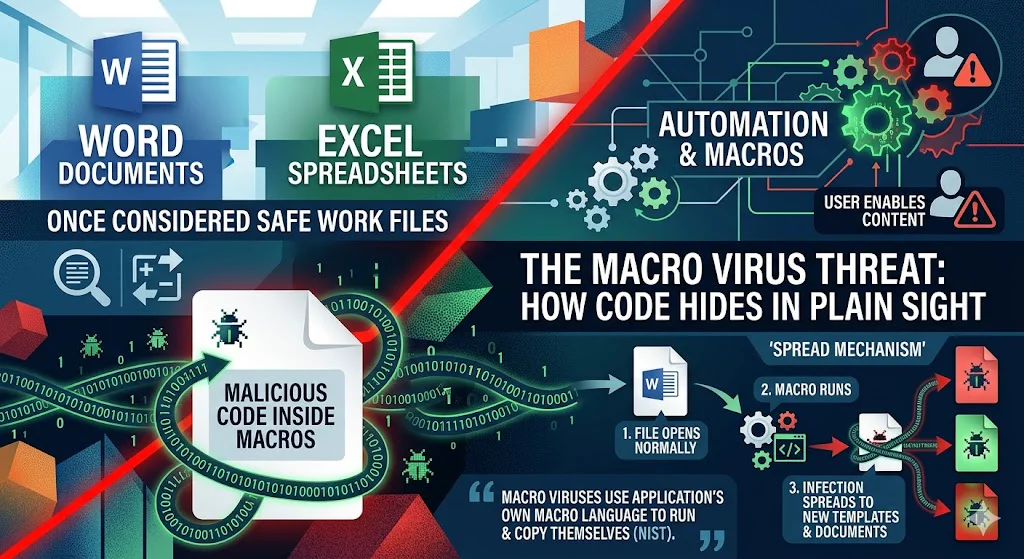
Macro viruses changed office software forever. For a long time, people thought of Word documents and Excel spreadsheets as safe work files. Then attackers found a clever trick: they hid malicious code inside macros, which are small programs built into Office files for automation. Microsoft defines a macro virus as malware stored in macros within Microsoft 365 files, templates, ActiveX controls, or add-ins.
That made office documents a threat, not just a tool. A file could look normal, open normally, and still carry code that spreads to other documents or templates. NIST explains that macro viruses attach to application documents such as word processing files and spreadsheets, then use the application’s own macro language to run and copy themselves.
Best Antivirus for Android: Does Your Phone Actually Need One?
Why office software became such a popular target
Office software was ideal for attackers because it was trusted, shared constantly, and designed to support automation. In other words, the same feature that helped users save time also helped malware spread. NIST describes macro viruses as especially successful because they exploit the macro capabilities inside popular productivity software, where users regularly exchange documents by email and shared storage.
That was the real problem: documents move differently from programs. People open them without suspicion. They forward them to coworkers. They store them in shared folders. A malicious macro could ride along with legitimate work and spread much faster than many older virus types.
Early examples that raised the alarm
One of the best-known early examples was Concept, which Microsoft identifies as the first widely known Word macro virus for Word 6. Concept spread by infecting documents and templates, including the Normal template.
Later, Melissa showed how damaging macro malware could become. Microsoft says Melissa was a macro worm that spread through email and by infecting Word documents and templates, using Outlook to reach new targets. That made macro malware a business disruption problem, not just a desktop nuisance.
Is Windows Defender Enough to Protect Your PC? The Honest Answer
How macro viruses affected office work
Macro viruses caused three big types of damage.
First, they disrupted daily work. Infected files could trigger unwanted behavior, change settings, or infect other documents and templates. Microsoft’s threat descriptions show that some macro malware tried to disable macro security features or alter registry settings so that infected files could spread more easily.
Second, they reduced trust. Office documents are meant for collaboration, but macro viruses made people cautious about every attachment and template. Microsoft now warns users not to enable macros unless they are certain they understand what the code does.
Third, they forced companies to build policies around document safety. NIST recommends patching productivity software, configuring macro settings carefully, and reducing opportunities for malware propagation.
Why macro viruses were so effective
Macro viruses worked so well because they used features that were already built into Office. They did not need to install a strange executable file to get started. They simply relied on the macro language inside the document itself. NIST notes that this made macro viruses relatively easy to write, modify, and spread.
They also worked because many users needed macros for legitimate tasks. That made the security tradeoff difficult. If a company disabled macros completely, some business workflows broke. If it allowed them freely, attackers had an opening. Modern Office security tries to solve that by using warnings, trusted locations, and default blocking for risky files.
Free vs Paid Antivirus: Is It Actually Worth Paying in 2026?
What modern Office does differently
Today, Microsoft Office treats macros as a risk that must be controlled. Microsoft explains that Office files may contain active content, but users are not supposed to enable it blindly. Microsoft also says macros from the internet are blocked by default in many cases, and Office security features are designed to stop unsafe content from running automatically.
This is a major change from the early macro-virus era. Instead of assuming a document is safe, Office now assumes active content deserves caution. That shift came directly from years of abuse by macro viruses and macro-based malware.
Do I Need Antivirus for My Chromebook? The Honest Answer
How to stay safe from macro viruses
The safest rule is simple: do not enable macros unless you trust the file and know exactly why the macro is there. Microsoft says you do not need to enable macros just to view or edit a file, and it warns users never to enable them unless they understand the function they provide.
For teams and businesses, the practical steps are straightforward: keep Office updated, use trusted sources only, and apply macro controls instead of allowing everything by default. Microsoft also recommends using antivirus protection to detect and remove malicious files.
Final thoughts
Macro viruses were one of the moments that changed computer security for office users. They proved that a harmless-looking document could carry malicious code, spread through normal business sharing, and disrupt entire organizations. That lesson still matters today because attackers still use Office files as a delivery method.
Modern Office is much safer than it used to be, but the basic advice has not changed: trust carefully, enable cautiously, and treat document-based code as a security decision, not a convenience.
FAQ
What is a macro virus?
A macro virus is malware stored inside macros in Office files, templates, or related active content such as add-ins.
Why were macro viruses so dangerous?
Because they spread through trusted documents and templates, which people share all the time in business environments.
Are macro viruses still a threat today?
Yes. Microsoft still warns users about malicious macros and continues to block or restrict risky macro behavior in Office.
Last Updated on May 22, 2026 by Security Guru Jay